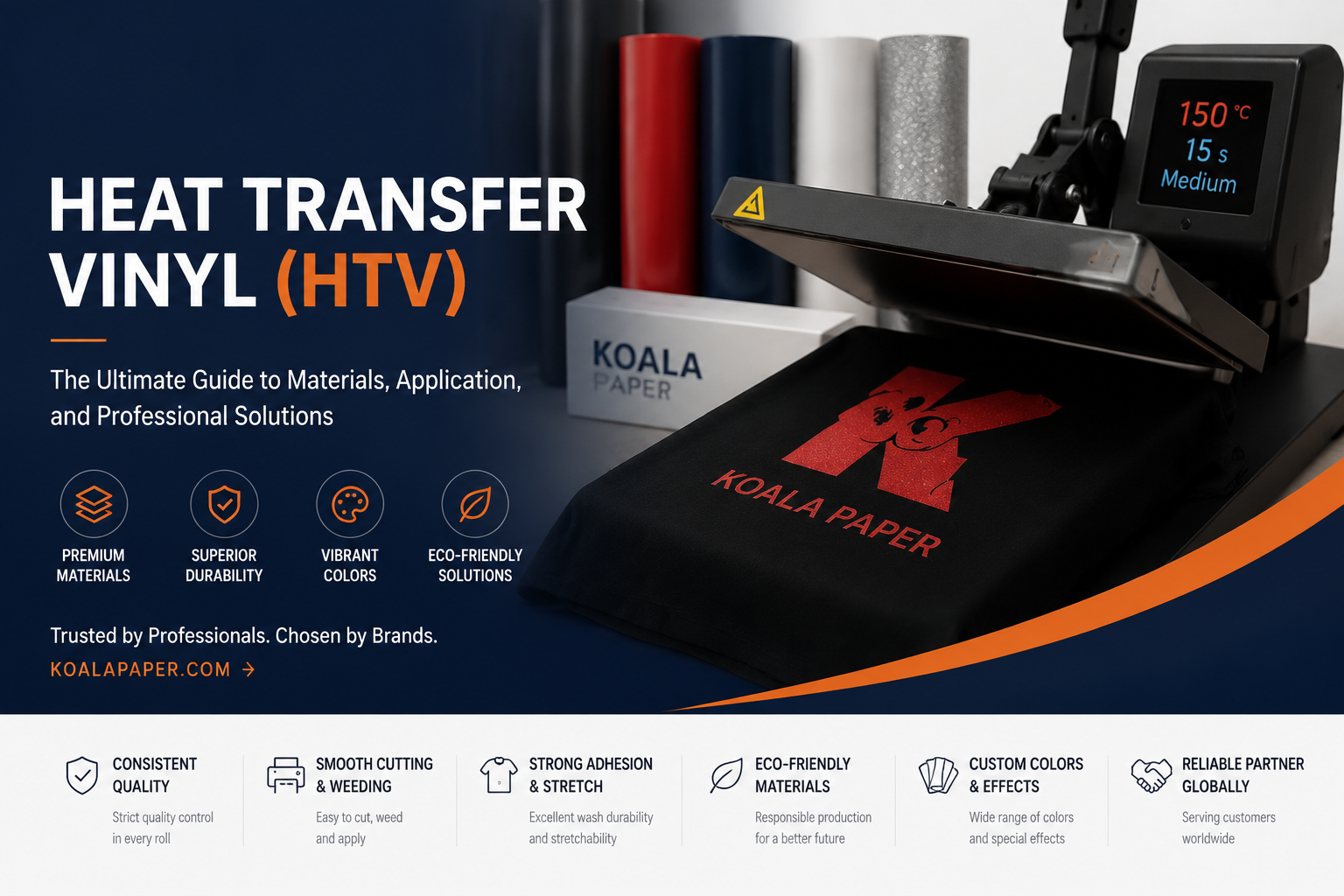
If you have ever seen a custom T-shirt with a bold name, number, or logo — think sports jerseys, team uniforms, or personalized gifts — chances are it was made with Heat transfer vinyl(HTV).
From custom T-shirts and sports uniforms to fashion brands and promotional garments. It is durable, versatile, and works on fabrics that other methods cannot handle — including 100% cotton.
As a professional heat transfer vinyl manufacturer,in this guide, I will explain everything you need to know about HTV: what it is, how it works, the different types available, what equipment you need, and how to use it step by step. I will also share insights from our manufacturing experience at Koala® Factory, where we produce high-quality PU heat transfer vinyl for customers worldwide.
This guide is based on material science, industry expertise, and real-world application experience.
What Is Heat Transfer Vinyl (HTV)?
Heat transfer vinyl — sometimes called iron on vinyl, heat press vinyl, or T-shirt vinyl— is a specially formulated material with a heat-activated adhesive backing.
Unlike adhesive vinyl used for signs and decals (which sticks at room temperature), HTV requires heat and pressure to bond with fabric. The heat activates the adhesive, permanently bonding the vinyl to the fabric fibers.
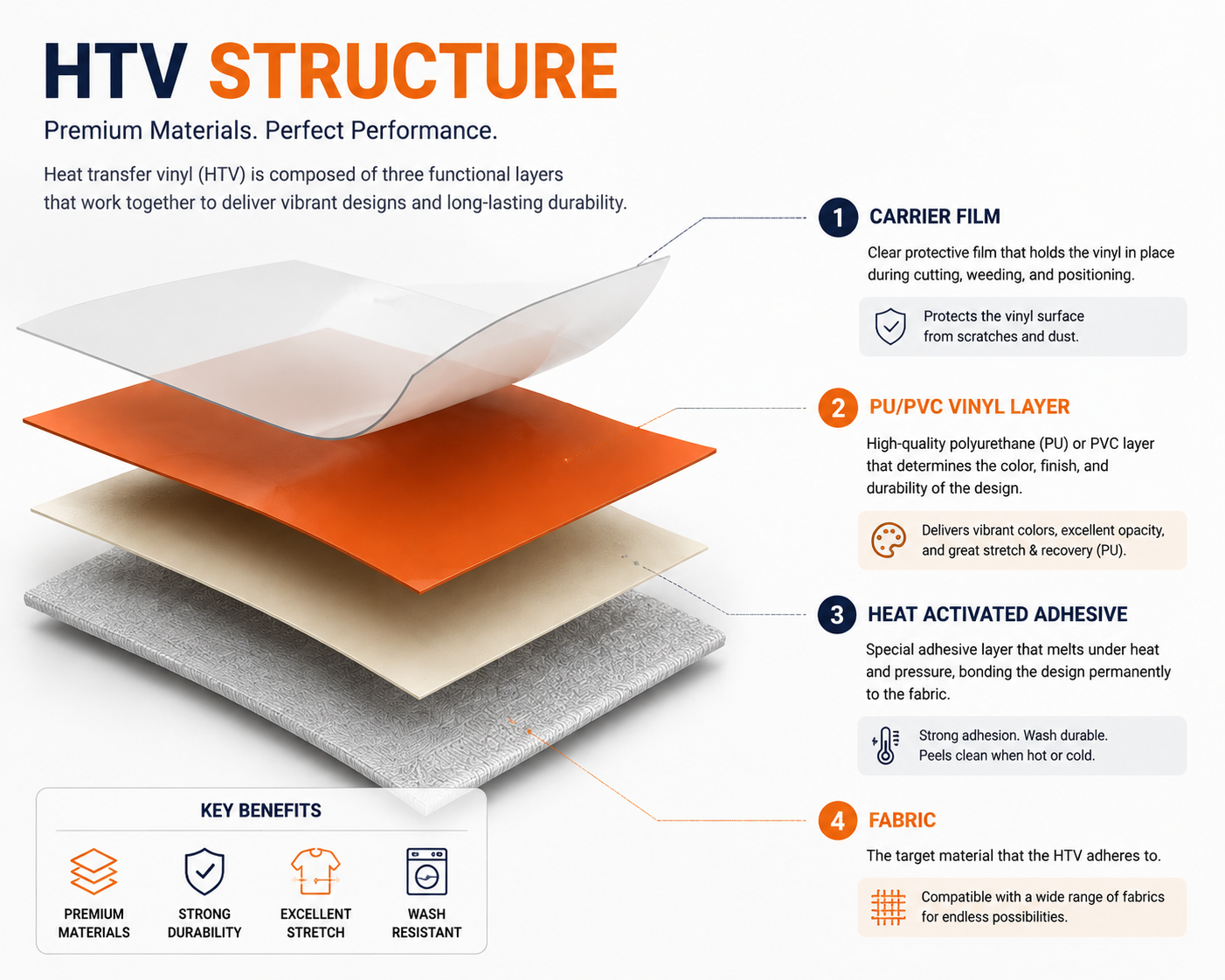
A typical HTV structure contains three layers:
- Carrier film: A transparent layer that keeps the design stable during cutting and pressing.
- PU or PVC vinyl layer: The decorative layer containing color and surface effects.
- Heat activated adhesive layer: The bonding layer that activates under heat.
HTV Vinyl typically comes in rolls or sheets
HTV vs Heat Transfer Paper: The Core Difference
Many beginners confuse HTV with heat transfer paper. They are completely different products:
| Feature | Heat Transfer Vinyl (HTV) | Heat Transfer Paper |
| Material | Thin vinyl sheet with adhesive | Paper with polymer coating |
| How it works | Cut into shapes, then heat-pressed | Printed with inkjet/laser, then heat-pressed |
| Design type | Solid colors, text, logos | Full-color, photos, gradients |
| Durability | Excellent — lasts 50+ washes | Moderate — 20–40 washes |
| Equipment | Vinyl cutter + heat press | Printer + heat press |
| Best for | Durable text, logos, simple shapes | Budget full-color images, casual use |
Key points: Heat transfer vinyl is cut, not printed; heat transfer paper is printed, not cut. Choose heat transfer vinyl for durability and a clean design; choose heat transfer paper for affordable full-color photos.
How Does Heat Transfer Vinyl Work?
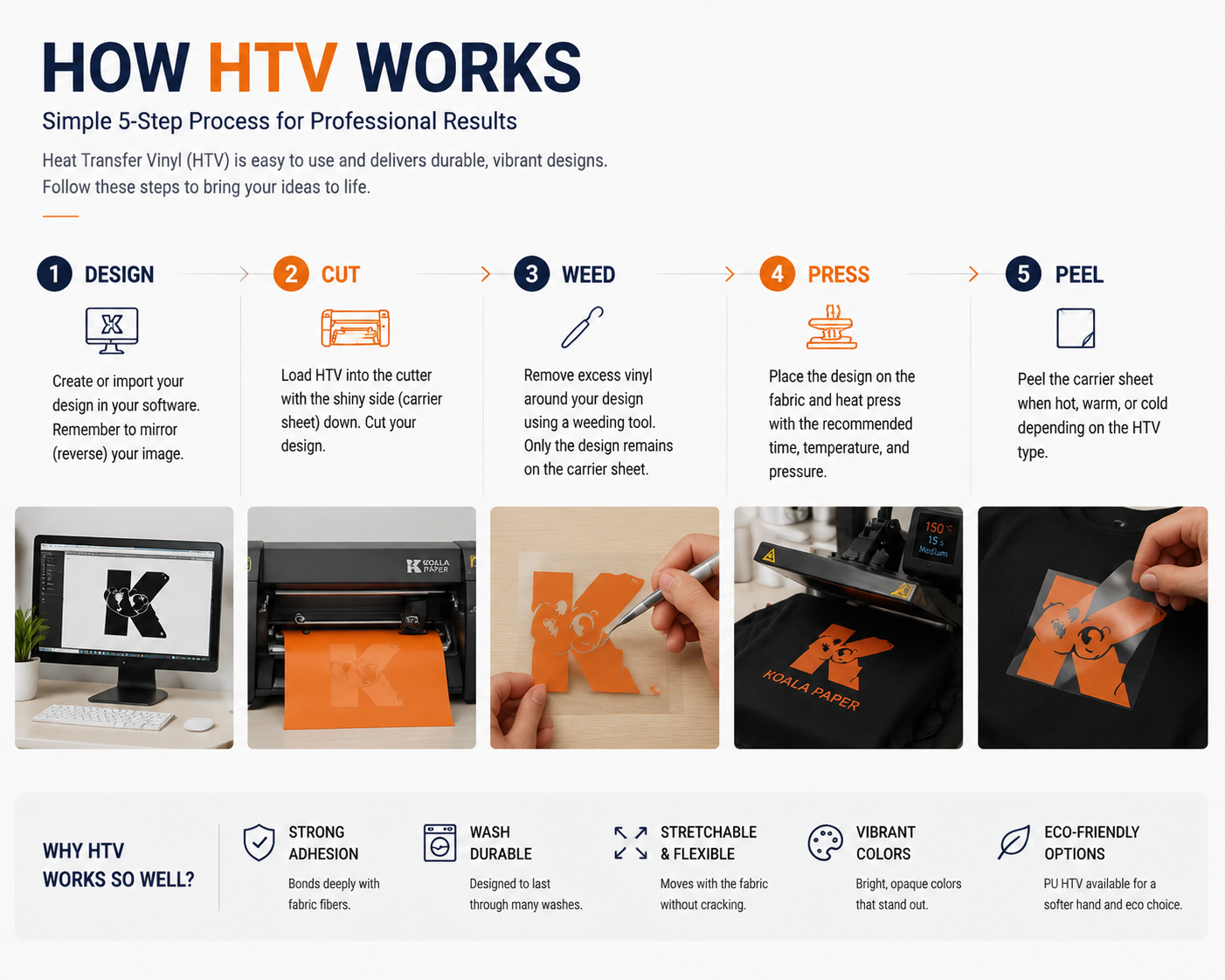
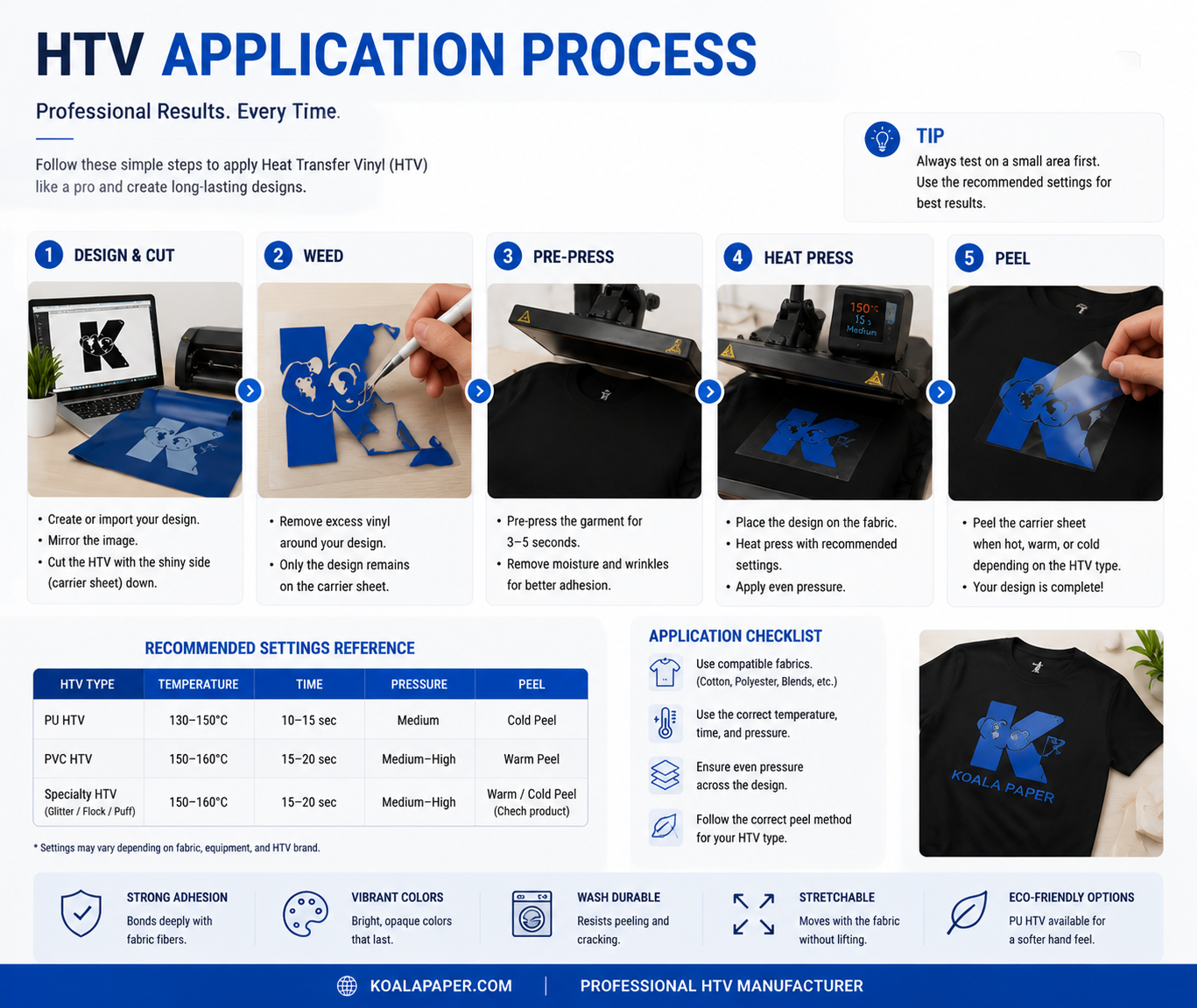
HTV Vinyl works through a simple but precise process:
Design → Cut → Weed → Press → Peel
During heat pressing, controlled temperature and pressure activate the adhesive layer. The adhesive softens and creates a strong connection with the fabric surface. After cooling, the design becomes a durable part of the garment.
When you apply heat (typically 305°F / 150°C) and pressure, the adhesive layer melts and bonds with the fabric fibers. The carrier sheet is then peeled away, leaving only the colored heat transfer vinyl permanently attached to the garment.
The HTV Workflow: Cut, Weed, Press
| Step | What You Do | Why It Matters |
| 1. Design | Create or import your design in cutting software | Must be mirrored (reversed) before cutting |
| 2. Cut | Load HTV into cutter, cut the design | Cuts through vinyl but NOT the carrier sheet |
| 3. Weed | Remove excess vinyl around the design | Only the design stays on the carrier |
| 4. Press | Place design on fabric, apply heat and pressure | Heat activates adhesive, bonding vinyl to fabric |
| 5. Peel | Remove carrier sheet | Hot peel, warm peel, or cold peel depending on HTV type |
Types of Heat Transfer Vinyl
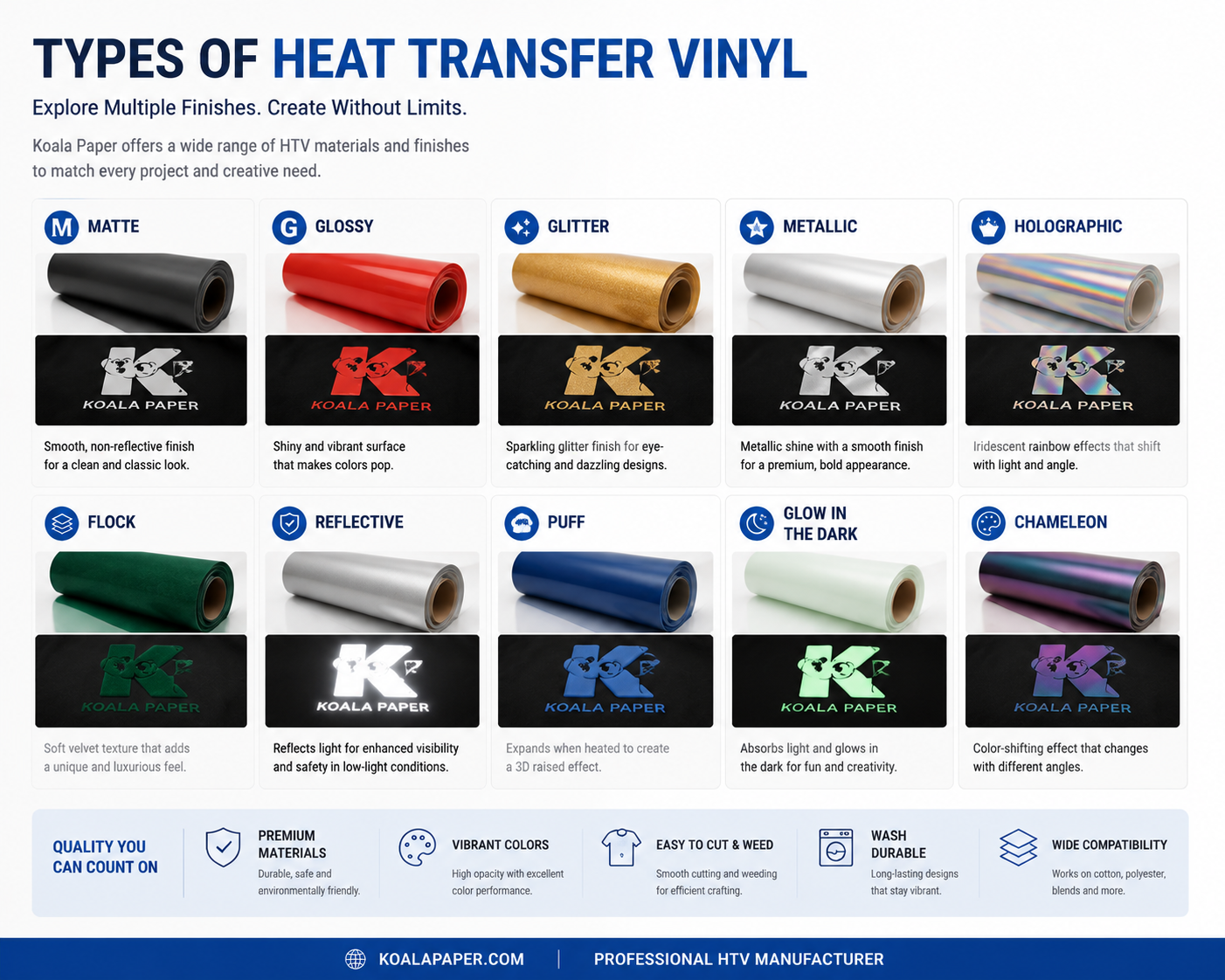
There are many types of HTV, each designed for different applications and effects.
By Material: PU vs PVC
PU heat transfer vinyl
PU HTV is widely used in professional apparel decoration because it offers:
- Soft hand feel
- Excellent flexibility
- Lightweight performance
- Good stretch recovery
- Comfortable wear
PVC HTV
PVC HTV is a more economical option. It is generally thicker and has a firmer feel compared with PU materials.
Special effect HTV includes:
- Glitter HTV
- Metallic HTV
- Flock HTV
- Reflective HTV
- Holographic HTV
- Puff HTV
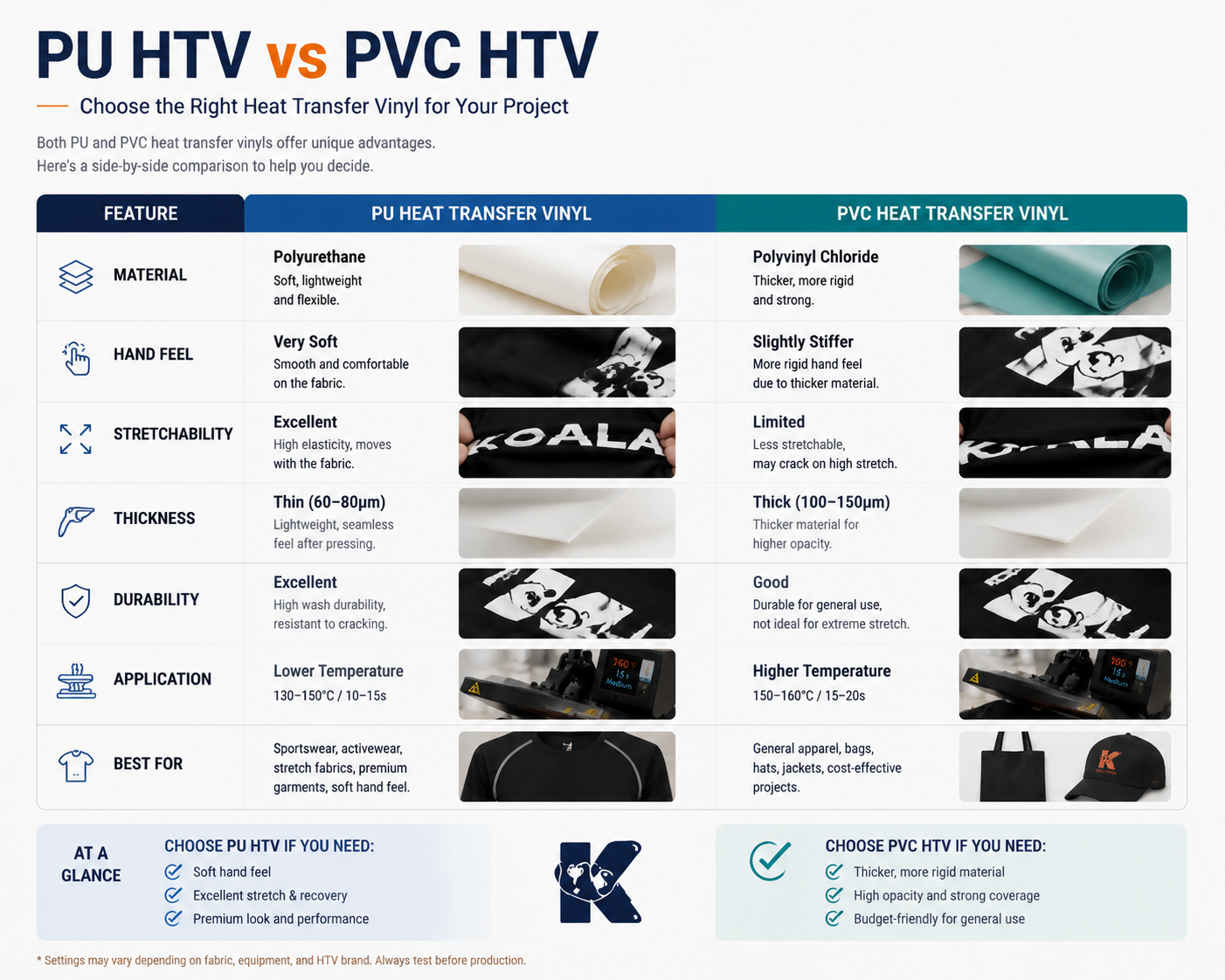
| PU HTV | PVC HTV | |
| Feel | Soft, matte, fabric-like | Thicker, more rigid |
| Elasticity | Excellent (>95% rebound) | Limited |
| Durability | 50+ washes | 20–30 washes |
| Eco-friendliness | PVC-free | Contains chlorine |
| Best for | Sportswear, apparel, quality products | Budget projects, simple designs |
Our recommendation: PU HTV is the professional choice for most applications. It is softer, more durable, and more comfortable against the skin.
By Finish and Effect
| Type | Description | Best For |
| Smooth / Matte | Clean, flat, professional finish | Everyday apparel, versatile use |
| Glitter | Sparkle and dimension | Kids' clothing, dance costumes, statement pieces |
| Metallic | Chrome-like, high-shine finish | Fashion-forward designs |
| Flocked | Raised, velvet-like texture | Athletic wear, branded merchandise |
| Reflective | Glows brightly under direct light | Safety, high-visibility applications |
| Printable | Can be printed with inkjet printer | Full-color photography, complex gradients |
| Puff | Expands when heated for 3D effect | Bold, textured designs |
| Holographic | Rainbow iridescent effect | Eye-catching, trendy designs |
| Glow-in-the-Dark | Absorbs light, glows in dark | Novelty, costumes, kids' items |
By Application Method
| Peel Type | When to Peel | Best For |
| Hot Peel | Immediately after pressing | Fast production, PU HTV |
| Warm Peel | Wait until carrier cools slightly | Some specialty HTV |
| Cold Peel | Cool completely before peeling | Glitter, flock, printable HTV |
How to Apply Heat Press Vinyl – A Step-by-Step Guide
Below is the complete process for applying HTV for t-shirts to clothing.
Step 1: Create and Mirror Your Design
- Create or import your design into your cutting software (such as Cricut Design Space, Silhouette Studio, etc.).
- Be sure to mirror (flip horizontally) your design before cutting.
- Why? HTV for t-shirts (HTV) are placed face down, so a non-mirrored pattern will appear reversed on the final garment.
Step 2: Cut Heat Press Vinyl
- Place the heat press vinyl on the cutting mat, smooth side down and colored side up.
- Select the correct material settings in the software:
- Adjust the blade settings according to your heat press vinyl type.
- The cutter should cut the vinyl, but not the carrier.
Step 3: Remove Excess
- Use a weeding hook to remove excess heat transfer vinyl around the design.
- Remove:
o Heat transfer vinyl outside the design boundaries
o Hollow parts of letters (e.g., "O", "A", "P")
- Only the design portion should remain on the carrier.
Step 4: Prepare the Garment
- Pre-press the garment for 3-5 seconds to remove moisture and wrinkles.
- Ensure the pressed area is flat and smooth—avoid seams. Zippers and thick edges
- Use a lint roller to remove dust and debris
Step 5: Iron the heat transfer vinyl
- Place the vinyl patterned side down on the garment
- Standard settings: 150°C (305°F), medium pressure, iron for 10-15 seconds
- Be sure to check the specific settings for your brand and model
- Apply even, consistent pressure
Step 6: Peel and Finish
- Follow the peeling method for your heat transfer vinyl pattern:
o Hot peel — Peel immediately
o Warm peel — Peel after it has warmed up
o Cold peel — Peel after it has completely cooled down
- Wait at least 24 hours before washing
- First wash: Turn inside out, cold water, gentle cycle
HTV Heat Press Settings Reference
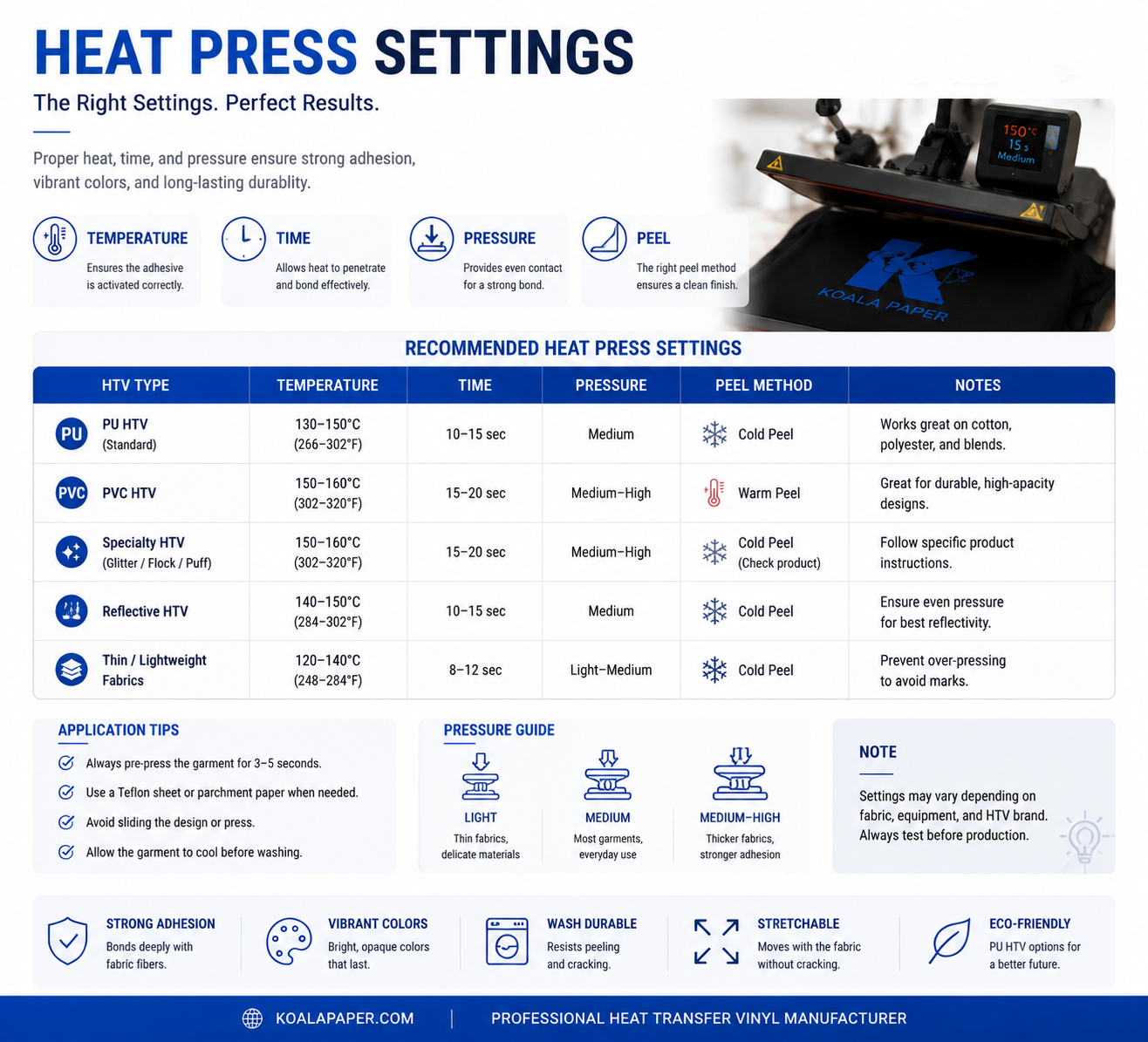
Different HTV types require different settings. Here is a general reference:
| HTV Type | Temperature | Time | Pressure | Peel |
| Standard PU HTV | 305°F (150°C) | 10–15 sec | Medium | Hot/Warm |
| Glitter HTV | 320–340°F (160–170°C) | 15–20 sec | Medium-firm | Cold |
| Flock HTV | 290–305°F (145–150°C) | 12–15 sec | Medium | Cold |
| Printable HTV | 305°F (150°C) | 15–20 sec | Medium | Cold |
| Puff HTV | 290°F (145°C) | 12–15 sec | Medium | Cold |
| Reflective HTV | 305°F (150°C) | 15 sec | Medium | Cold |
Always check the htv vinyl manufacturer's spec sheet for your specific HTV product. Every brand and type has its own optimal settings.
Common HTV Problems and Solutions
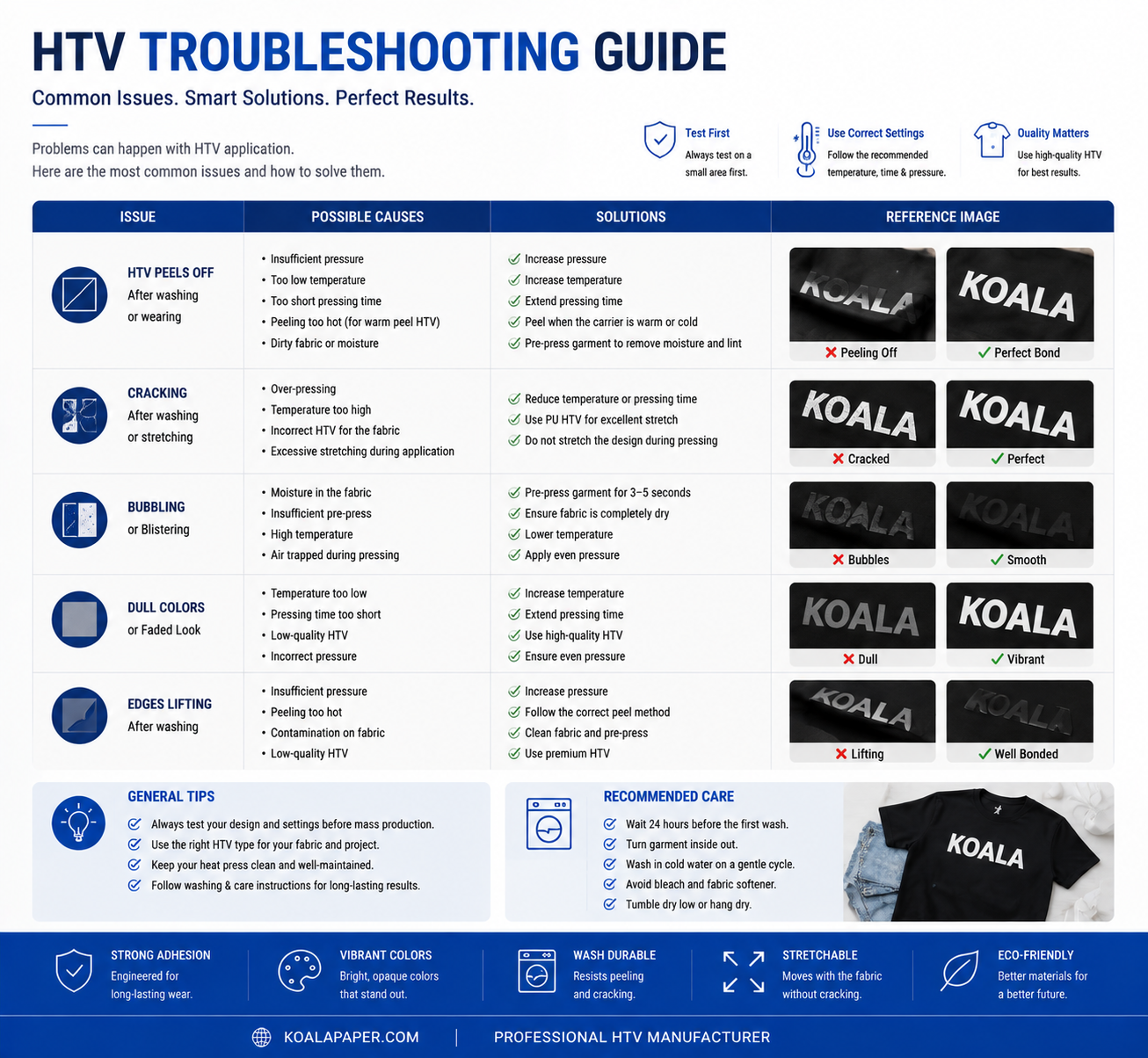
Why is my HTV peeling?
Possible causes:
- - Insufficient temperature
- - Incorrect pressure
- - Poor fabric preparation
Why does HTV crack?
Possible causes:
- - Low-quality material
- - Incorrect application
- - Lack of elasticity
Why does HTV not stick?
Solutions:
- - Check heat press settings
- - Remove fabric moisture
- - Confirm material compatibility
Heat Transfer Vinyl for T Shirts Applications
HTV is widely used for decorating:
- Custom T-shirts — personalized designs for events, teams, or gifts
- Team uniforms — names, numbers, and logos
- Hoodies and sweatshirts — bold designs on comfortable fabrics
- Tote bags — promotional items and custom accessories
- Sportswear and jerseys — durable designs that move with the athlete
- Workwear and corporate apparel — professional logos and branding
- DIY and craft projects — personalized gifts and handmade items
Why Choose Professional PU Heat Transfer Vinyl?
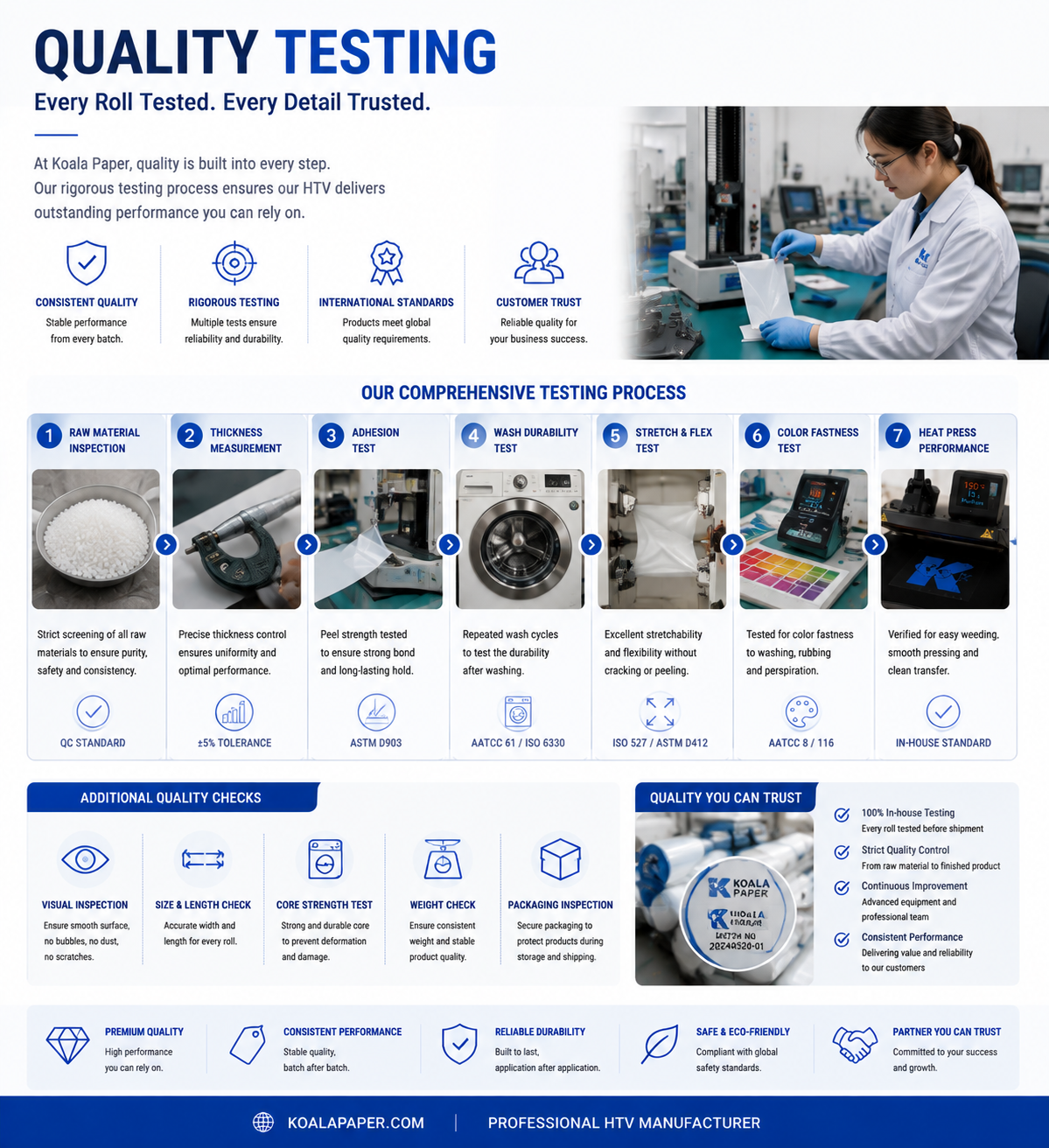
our PU heat transfer vinyl is developed for professional apparel decoration applications, helping brands and printing businesses achieve consistent transfer quality.
Our PU HTV Advantages
Soft, Professional Finish
Our PU HTV delivers a soft, matte finish that feels like part of the garment. It is comfortable against the skin and moves naturally with the fabric.
Exceptional Durability
Our PU material resists fading, peeling, and cracking — even after repeated washing. Designs stay vibrant and intact for the life of the garment.
Compatible with Cricut and Other Cutters
Our PU HTV works seamlessly with Cricut, Silhouette, and other hobby cutters. Easy to cut, weed, and transfer.
Factory-Direct Pricing
As a manufacturer with 20+ years of experience, we offer competitive pricing without compromising quality.
Multiple Sizes and Colors
Available in various sizes (12×20ft, 12×8ft, and custom lengths) and colors (white, black, and custom colors available).
How to Choose a Heat Transfer Vinyl Manufacturer
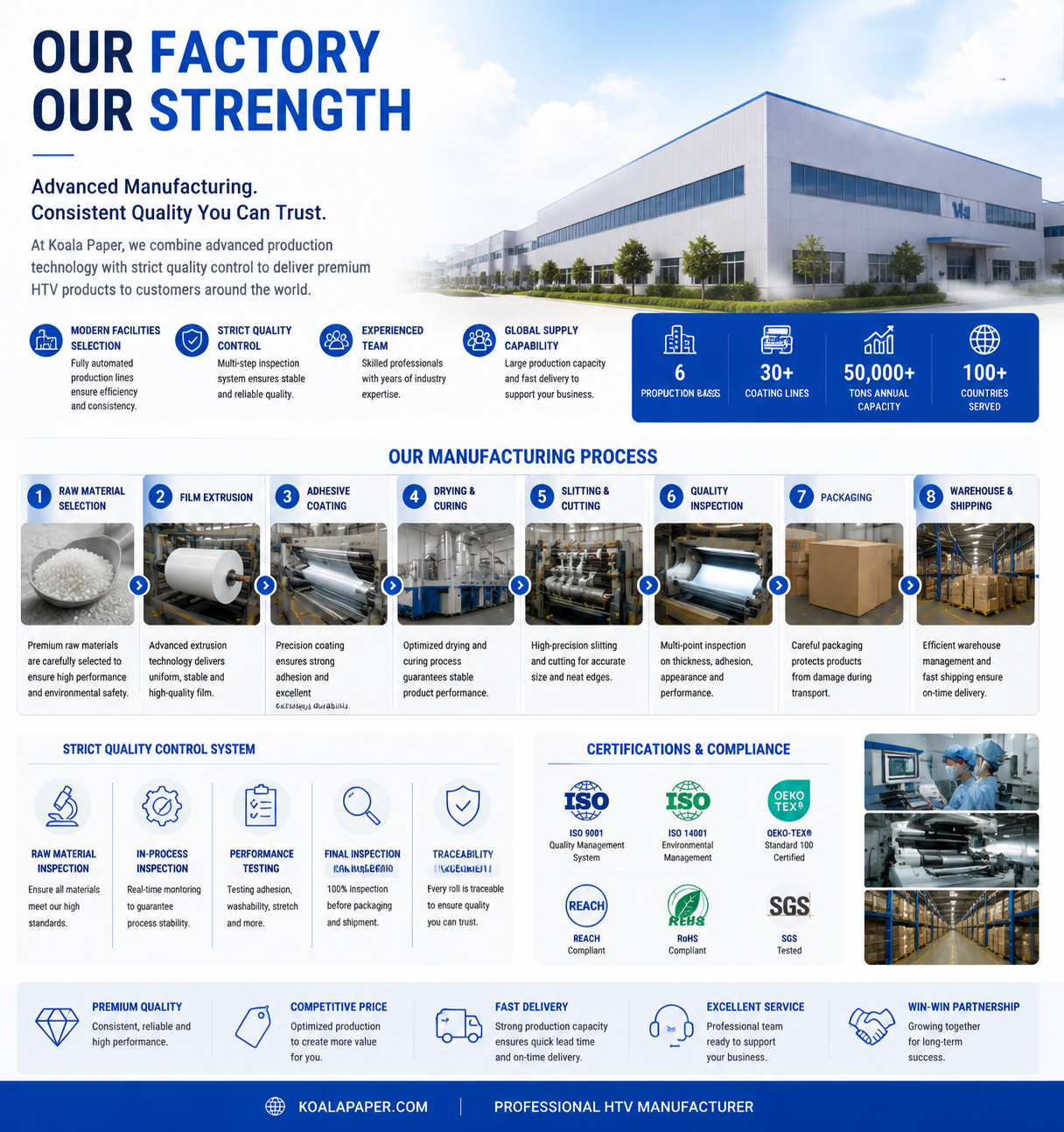
When selecting a heat transfer vinyl manufacturer, consider:
1. Manufacturing capability
2. Material consistency
3. Quality testing systems
4. Custom color and size options
5. Stable supply capacity
6. Technical support
A reliable manufacturer should provide not only products, but also application knowledge and production support.
Final Verdict
Heat transfer vinyl remains one of the most versatile technologies for garment customization. It works on cotton — something sublimation cannot do — and offers exceptional durability that heat transfer paper cannot match.
HTV is the professional choice for:
- Team uniforms and sportswear
- Custom T-shirts and hoodies
- Durable logos and text
- Dark fabrics
Choose PU HTV for the softest feel, best durability, and most comfortable results. Choose PVC HTV only if budget is your primary concern and durability is not critical.
Can I use a household iron instead of a heat press?
Yes, but a heat press gives more consistent results. If using an iron, turn off steam, set to the highest cotton setting, and apply firm, even pressure.
Why do I need to mirror my design?
HTV is applied face-down. Without mirroring, the design will appear reversed on the final garment.
How long does HTV last?
Properly applied PU HTV lasts 50+ washes without cracking, peeling, or significant fading.
Can HTV be used on dark fabrics?
Yes. HTV provides excellent opacity and works on both light and dark fabrics. This is one of its key advantages over sublimation.